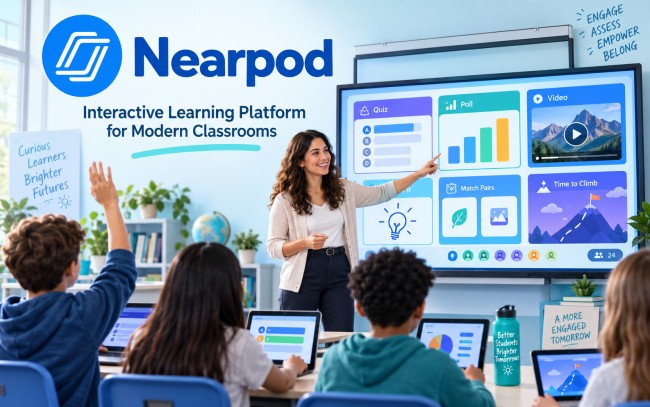
Nearpod is an education technology platform built to make classroom lessons more active, visual, and engaging. It allows teachers to combine presentations, videos, questions, games, and assessment tools in one digital lesson. Students can take part from their own devices while teachers see responses as learning happens. The system is designed to support teachers rather than replace them.
The platform is widely used in K–12 education. Teachers can create material from the beginning or upload resources they already use, including PowerPoint files, Google Slides, PDFs, videos, and YouTube content. This gives educators the freedom to improve existing lessons instead of creating everything again.
Nearpod Company Background and Ownership
The company was founded in 2012 by Guido Kovalskys, Felipe Sommer, and Emiliano Abramzon. The founders saw a need for software that could connect instruction with student devices. Their idea grew into a platform focused on participation, classroom interaction, and instant feedback.
Nearpod is based in Dania Beach, Florida. In 2019, it acquired Flocabulary, a learning service known for using hip-hop videos and creative media to teach academic subjects. That move expanded the range of digital learning content available to schools.
How Nearpod Became Part of Renaissance
In 2021, Renaissance acquired the company as part of its wider education technology portfolio. Renaissance develops assessment, reading, mathematics, practice, and instructional products for schools. The connection brought together classroom instruction with student assessment and personalized learning tools.
The platform now sits within a larger education group. Renaissance connected its Star Assessments with the instructional library, helping teachers move from assessment results to suitable learning resources. This connection can support more focused teaching for individual students, small groups, and full classes.
Nearpod Quick Info
| Detail | Information |
|---|---|
| Name | Nearpod |
| Type | Interactive learning platform |
| Industry | E-Learning / EdTech |
| Founded | 2012 |
| Headquarters | Dania Beach, Florida, USA |
| Parent Company | Renaissance |
| Joined Renaissance | 2021 |
| Main Purpose | Interactive teaching and student engagement |
| Key Features | Lessons, quizzes, polls, games, videos, assessments |
| Teaching Modes | Live Participation, Student-Paced, Front of Class |
| Lesson Library | 22,000+ learning resources |
| Popular Game | Time to Climb |
| Users | Teachers, students, schools, and districts |
| Free Plan | Silver Plan |
| Website | nearpod.com |
How Nearpod Works
The basic process is simple. A teacher creates or uploads a lesson, adds interactive elements, launches the session, and invites students to join. During the lesson, students answer questions, complete activities, watch media, or respond to prompts. Their teacher can review results during the session or after it ends.
This structure changes a standard presentation into a two-way learning experience. Instead of only listening to a lecture or viewing slides, students take part throughout the lesson. Teachers can use those responses to identify mistakes, check understanding, and adjust instruction when needed.
Nearpod Lesson Creation and Content Library
Teachers do not need to build every resource themselves. The platform includes more than 22,000 standards-aligned lessons, videos, and activities created by curriculum experts and education partners. Its library includes thousands of interactive lessons, videos, stand-alone activities, and formative assessment resources.
Teachers can customize these materials for their own class. They can also bring in existing PowerPoints, Google Slides, PDFs, video files, and online videos. This can reduce preparation time while teachers keep control over lesson goals and pace.
Nearpod Interactive Activities and Formative Assessment
One of the strongest parts of the platform is its interactive toolkit. Educators can use Draw It, Polls, Drag & Drop, open-ended questions, quizzes, collaborative tasks, simulations, and other activities. These tools help students show what they know in different ways.
Formative assessment is built into the lesson process. Teachers can collect answers while teaching and view post-session results later. This gives them a clearer view of who understands the topic, who needs more help, and which ideas may need to be taught again.
Nearpod Teaching Modes
The platform supports three main delivery styles: Live Participation, Student-Paced, and Front of Class. Each mode serves a different teaching need across classroom and remote settings.
Live Participation gives the teacher control over lesson pace while students join on their own devices. Student-Paced mode lets learners move through assigned material independently. Front of Class allows the teacher to present content, including interactive video, to the whole class without requiring every student to join from a separate device.
Nearpod Features for Teachers and Students
Teachers gain access to dashboards, lesson results, instant responses, and post-session data. These tools help them notice learning gaps and give feedback while the lesson is active. Students gain more chances to participate, which can help quieter learners contribute without speaking in front of the whole class.
The platform also includes game-based learning. Time to Climb turns review questions and quick checks into a competitive classroom game with immediate feedback. Virtual reality experiences, PhET simulations, interactive video, and other media can make difficult ideas easier to explore through visual and practical experiences.
Nearpod Integrations and Device Support
The service works with common school technology and learning management systems. Official integrations include Canvas, Schoology, Google Classroom, Microsoft Teams, and Blackboard. Schools can also use single sign-on, rostering, and cloud storage.
Teachers and students can use the platform through many devices, browsers, and operating systems with an internet connection. This flexibility supports classrooms that use Chromebooks, laptops, tablets, or other connected devices. Existing files from Google Drive and OneDrive can also fit into lesson preparation.
Nearpod AI Create and New Tools
Artificial intelligence has become part of the platform’s newer lesson-building features. AI Create includes tools for generating questions and, on eligible school or district plans, creating lessons. Teachers must review and edit generated material before it reaches students, keeping human control at the center of instruction.
In 2026, the company introduced reading-level adjustments that can adapt lesson text for different grade levels while keeping the lesson structure intact. Teacher Notes were also added to help educators keep prompts, reminders, answer keys, and discussion points beside lesson slides during instruction.
Nearpod Pricing and Plans
Individual educators can begin with the free Silver plan. It includes 300 MB of storage, up to 40 student joins per lesson, core interactive creation features, access to the large lesson library within storage limits, real-time insights, and post-session results.
Paid individual options provide more storage, larger session limits, and extra tools. The Gold plan is priced at $159 per year with up to 75 student joins, while Platinum is $397 per year with up to 90 joins. School and district packages add higher session capacity, administrative dashboards, shared libraries, integrations, and dedicated support.
Why Nearpod Matters in Modern Education
Modern classrooms need more than digital slides. Teachers need to know whether students are following the lesson, where confusion begins, and what action should come next. This platform brings instruction and feedback into the same space, helping educators make decisions while learning is taking place.
Its greatest strength is the way it combines content, interaction, assessment, and delivery. A teacher can present an idea, ask students to respond, review class results, and change direction without moving between many separate tools. That creates a smoother teaching process and a more active learning experience.
Final Thoughts on Nearpod
Nearpod has developed from an early classroom technology idea into a broad instructional platform within Renaissance. Its combination of interactive lessons, videos, games, assessment, data, integrations, ready-made resources, and AI-assisted tools gives teachers many ways to build engaging learning experiences.
The platform remains centered on the role of the teacher. Technology provides the structure, activities, and data, but educators still decide what students learn and how instruction should change. For schools seeking stronger participation, flexible lesson delivery, and clearer insight into student understanding, it offers a powerful set of classroom tools. It also gives educators flexibility to move between whole-class teaching, individual practice, homework, and blended learning without changing the core lesson or losing access to student responses.